
Search engines make use of AI to improve their search results. There are AI models that can understand the meaning of a sentence or document. They often present their results as embeddings of the document space into a vector space: . These are called vector embeddings.
Once you’ve found the embeddings for your documents, you wait for a query to come in and compute its embedding as well. By comparing the dot product of the normalized vectors — one for a document and one for a query — you can tell if the query and document are on the same subject. That provides a score you can use in your rankings.
I took an off-the-shell sentence transformer model that was as small and cheap to run as possible. The one I chose was all-MiniLM-L6-v2. Not only did it work with my Mac’s graphics card, but it also allowed me to compute an embedding into a smaller 128 dimensional vector space. Many models compute 1024 dimensional embeddings.
It took me two days to run the model, on and off, for all 7 million Wikipedia documents. The resulting recordio file is 3.94 GiB which is up from 530 MiB with only keywords.
For now, I’m storing all the scoring information in memory and only keeping the search index out on disk using my SSTable. So, I started having trouble loading it into my Google Compute Engine e2-standard-2 server with only 8 GiB ram.
byte64:~$ mem.sh
cookie_server 79.19 MB
search_server 6202.42 MB
sstable_server 5.93 MB
gateway 476.07 MB
Two quick optimizations helped.
- I moved the ScoringInfo out of the protocol buffers and into its own struct. Since I know the exact size of the vectors, they can be stored as a fixed size array.
struct CompactScoringInfo {
    key: String,
    keywords: Vec<String>,
    embedding: Option<[f32; 128]>,
}- I noticed the gateway was often using a ton of memory when I would run the “roman empire” query which has 312,720 results. Just reading in the search response with that many entries and writing it back to json can take a ton of memory. I’ve now capped the results at 100 in the RPC request between the gateway and the search server.
With those quick improvements the server is now health, though red-lining.
byte64:~$ mem.sh
cookie_server 79.37 MB
search_server 6026.41 MB
sstable_server 6.02 MB
gateway 12.27 MB
The CompactScoringInfo didn’t make as much of an improvement as the gateway fix. And, as always, there’s more work to do there.
Let’s talk scoring! After I do the keyword search, I’m left with a ton of documents that need to be scored and ranked. Each of these documents has its own vector and we can embed the query as . If these two vectors point in the same direction, then they’re on the same subject. We can turn this into a semantic scoring metric by computing the cosine of the angle between them:
Recall, and decreasing until 180 degrees, so having a smaller angle between them gives a number closer to 1. We can pre-normalize all our vector and compute the dot-product with really quickly.
I’ve made a 50-50 blend of this score with my quick keyword search to compute the final score.
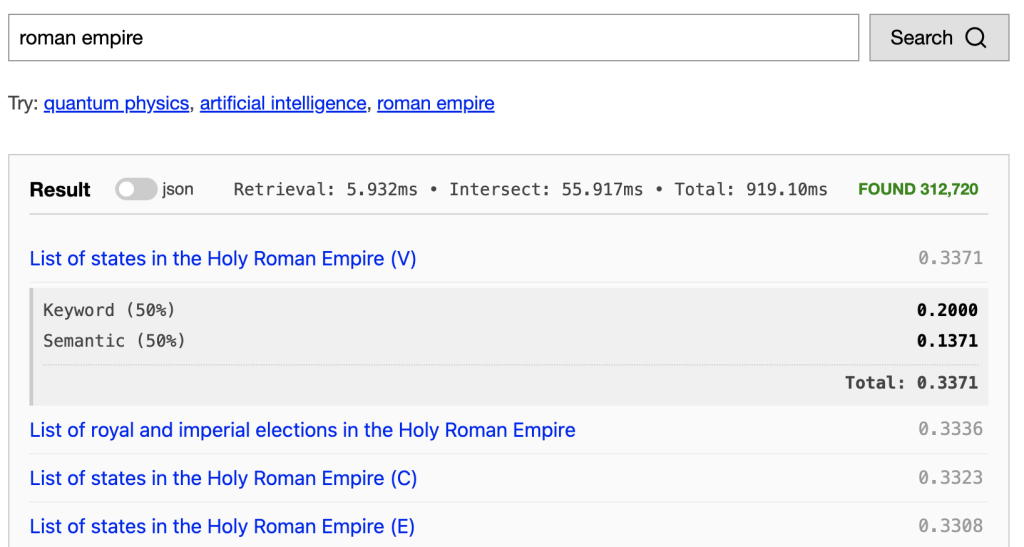
The results of using this simple embedding aren’t great, but they are starting to match the semantics of the query. Try them out at https://byte64.com/search/.
There’s so many things to try next with these embeddings. I’m interested in looking at vector retrieval algorithms which lookup documents near the query embedding, rather than only looking at documents that have the exact words of the query.
~Andrew
Leave a Reply