
When I first put the SSTable server on Google’s Compute Engine, I opted for the cheapest machine: an e2-small (2 cores and 2GB ram) with a standard persistent disk of 20 GiB. When I ran the server, each request was taking hundreds of milliseconds.
Installed iotop and found I was getting at most 8 MiB/s during my performance tests. I also found this and more in the Cloud Engine performance dashboards:
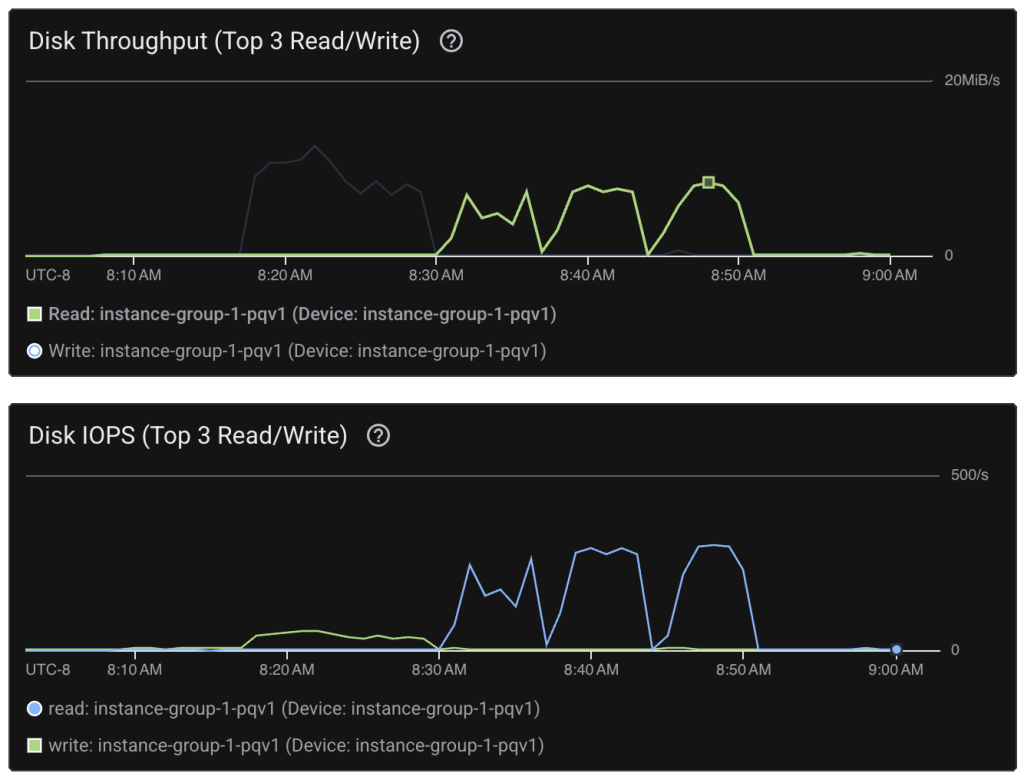
According to the disk performance guide for a standard persistent disk on my two core machine should give at most 3000 read operations per second with 240 MiB/s read throughput. These are disk maximums. You only get quota for a part of this, dependent on howhow much of the drive you have allocated. For instance, a regional standard persistent disk with 20GiB reserved will give you only 0.75 * 20 = 15 read operations per second and 0.12 * 20 = 2.4 MiB/s. I was lucky to be getting the numbers I was.
So, I decided to upgrade to SSD. This improved the read throughput 5-fold (to 46.07MiB/s) and the read operations increased similarly (to 1750 operations per second). And it got the my latency down to 7ms. That’s a far cry from the sub 100μs I was hoping for, but it may improve as I scale up the disk size.
byte64@vm:~$ ./sstable profile enwiki.sst 40000

Profile results for 40000 lookups:
  Average time: 6.919699ms
  Min time:     7.443µs
  Max time:     50.337263ms
The whole wikipedia corpus (with records chopped off at 1KB) is available at https://byte64.com/search/.

~Andrew
Leave a Reply